
Morning Dew

It’s not a particularly amazing composition, I know, but I do really like the dew pattern; and upon noticing it, I didn’t even think twice about pulling out my iPhone 4 and shooting it: by now I’m pretty confident in its ability to do a good job with the detail in macro-ish shots like this. Be sure to click the image to see it at 100%.
The iPhone 4 camera is really quite good, especially in comparison to the one in the 3G, which was basically worthless for anything other than well-lit non-macro close-range portraits. I mean, it was "decent for a cell phone camera", but you wouldn’t want to use it for anything too important. Not so with the iPhone 4.
Sunset Sky


I took these photos with the iPhone 4, whose camera is far better than that in the 3G. It’s probably about as good, in terms of image quality, as my Sony DSC-S85, which is 10 years old now.
The Difference Between Apple and Microsoft
On this week’s TWiT they talked briefly about the original, 5 GB, hard-drive-based iPod, and Dan Shapiro said:
I was working at Microsoft when this came out, and everybody was clustered around one of the first ones that somebody brought in. And the thing that got everybody, just, their heads spinning around, was they put a speaker in here just so that they could make it click when you turned the wheel. That was what blew everybody’s mind. And everybody around the table said, "We would never do that here."
Leo responded: "No. Because it’s bad engineering! It’s crazy! And yet, it’s great UI. It’s brilliant UI."
iPhone Annoyances, and Why I Plan to Buy an iPhone 4 Anyway
On June 7th, Steve Jobs introduced iPhone 4, the 4th hardware generation of the iPhone. It’s slightly less wide and 24% thinner than the previous version, but at the same time has better battery life and a faster processor. Its new "Retina Display" has 4x the resolution of the old hardware (960x640, up from 480x320), giving it a pixel density of 326 ppi, which is as good as or better than a lot of printed-paper text. It’s got a much-improved camera that shoots 5 megapixel photos (up from 2), has a built-in flash, and also records 720p HD video -- with a new in-phone version of iMovie for editing and publishing videos without needing a PC. There’s also now a front-facing camera to allow for video calls, although initially this will be limited to wifi; it won’t work over the cell phone network.
One of my favorite things about iPhone 4 is the physical design: I liked the original and the 3G, but this one is definitely nicer. The front and back are flat, with the corners only being rounded in 2D along the sides, as opposed to the old design where each corner was semi-spherical with its rounding including part of the back as well. And the back is now made of aluminosilicate glass, rather than metal or plastic as before; Apple says it’s the type of glass used in the windshields of helicopters and high-speed trains. Between the front and back glass panels is the thin stainless steel frame, the sides of which are part of a new antenna system that should improve signal quality, although the infamously bad AT&T cell service that some iPhone users complain about (mainly in NYC and SF) has never been a problem for me anyway.
The iPhone is Not Perfect
Lately I’ve been frustrated by my iPhone. And by lately, I mean for the past year or so. My original iPhone was great, and my iPhone 3G was great until I installed the version 3 software update on it, in 2009. Apple released the iOS3 software at the same time as the iPhone 3GS hardware, which was mostly just a "speed bump" upgrade from the 3G. I didn’t get a 3GS, for a few reasons: I would have had to pay the expensive, non-subsidized price of $499 or $599 instead of $199 or $299; it wasn’t a huge upgrade anyway, being physically identical and hardware-wise very similar to my 3G; and I really wanted a 64GB version, but the 3GS still only went up to 32GB of storage.
But when I installed iOS3 on my 3G, it got sluggish. Not terribly so, and not all the time, but enough that it started to really bother me. The iPod, iTunes, and Safari apps crash frequently -- usually several times per day. When this happens I just re-launch the app and then it works fine, but it’s really irritating nonetheless. And there’s usually no loss of data, but sometimes -- once or twice a week -- this causes the phone’s iTunes library to revert to an older state, forgetting the listened/watched status of my last few podcasts, and losing my place within the one I’m currently listening to. That’s super frustrating. Worst of all, once every couple months, a crash results in the iTunes library becoming totally corrupt, to the point that the iPod app says "No music found", even though I’ve got over 10 gigs of music on it, and syncing with my Mac fixes the problem quickly (without transferring any music; it just rebuilds the library).
The iPhone really should have a built-in "rebuild iTunes library" feature, because having this kind of corruption occur when you’re away from your Mac -- out of town, or across the country on vacation, etc -- makes me want to kill someone. And by someone I mean Apple. And not only for that reason; there’s also the fact that iTunes is a piece of absolute garbage, screwing up all my podcasts on every single sync: changing podcasts I’ve watched back to unwatched & vice-versa, and losing my place within podcasts. Because of this, I dread syncing, and only do it once a month or so.
The podcast section of the iPod app is extremely jerky when scrolling, despite the fact that there’s only 14 items in the list, whereas my album list with over 150 items scrolls smoothly. This combined with the shoddy podcast syncing, and the status/position memory bugs, lead me to believe that no one at Apple has ever watched or listened to a podcast.
I believe that the ol’ iPhone 3G is simply not powerful enough (in CPU and RAM) to run iOS3 well, and Apple should not have offered iOS3 for 3G users. That would have pissed off a lot of people, but I’d rather have a stable phone with fewer features than a more full-featured phone that crashes all the time.
All of that to say this: much of my frustration with my iPhone is due to my 3G becoming relatively less powerful as the iOS software has grown, so these frustrations don’t give me pause when I consider upgrading to iPhone 4. Its much more capable hardware will resolve most of these issues.
Smaller iPhone Gripes
There are other things that bug me about the iPhone that are more minor, though some are still quite aggravating. There’s no scale bar in the maps app. It’s been that way since day one and it defies all logic. PUT A FRIGGIN’ SCALE BAR ON THE MAPS APP ALREADY, Apple. It’s hard to believe I’m the only iPhone user who wants to know about distances while using a map.
There’s no in-page search in Safari. You can’t view the source-code of webpages nor emails. You can’t set per-email alerts, nor even per-email-account alerts; you can only enable an option to "alert me for every single email that arrives", which is entirely useless.
The iPod app’s playlist support is idiotic. When viewing my "2010" playlist for example, which contains all my albums from 2010, it’s impossible to choose an album and play it. The only option is to play every single song from every album in the playlist.
Some of these issues are geeky or esoteric, but others are just obvious and their absence ridiculous. I know that Apple doesn’t want to implement half-baked solutions, which is ostensibly the reason it took so long for them to add copy & paste -- which they did totally nail -- but at the same time, they are quite clearly allowing the perfect to be the enemy of the good in many cases.
Crap That Apple Would Never Let a Third-Party App Get Away With
In the iPod app, at the bottom of each podcast’s episode list, there’s a "Get More Episodes..." item that you can tap. But instead of simply loading more episodes right there in the same view, like the Mail app does for getting more messages from the server, the iPod app launches the iTunes app for this. That’s stupid and annoying, especially on a resource-constrained 3G that’s prone to crashes.
But what’s inexcusable is what you see when you arrive in the iTunes app:
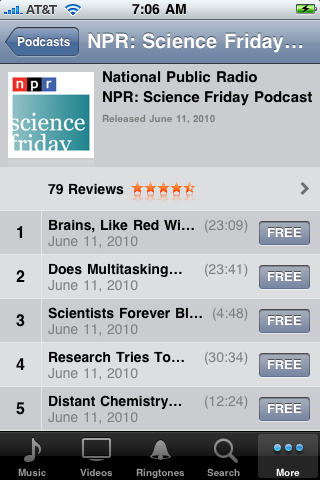
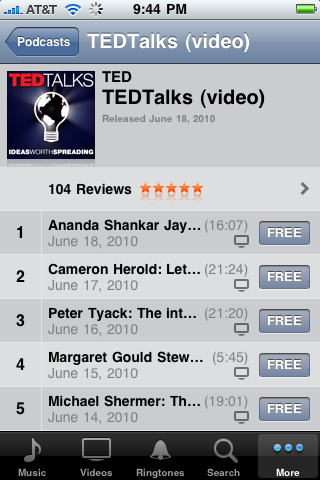
Those listings are worthless. You have no idea what any of those episodes are about, and no way to figure it out either. The listings within the iPod app, for the episodes you’ve already got, are just the same: it’s impossible to know what the topics are because of a) how stupidly short the names/titles are truncated, and b) the fact that nowhere on the device are the full names/titles displayed, not even while you’re playing them.
This kind of inattention to detail is uncharacteristically careless for Apple, and it’s the kind of thing that Gruber and all the rest would rightly criticize a third-party app for. But I haven’t heard a peep about this issue regarding Apple’s own built-in apps.
So Dump the Stupid iPhone Already
With all these iPhone issues, why don’t I switch to a different smartphone? Because the iPhone is an amazingly beautiful, useful, and fun device. It’s not perfect, but nothing is. And at this point I don’t consider any of the iPhone’s competitors to be quite as good as it is.
With the introduction of the Droid Incredible and the HTC EVO, the iPhone does finally have some reasonable competition. I’ve been using Linux on my desktop for 10 years and I love the idea of having it on my phone. I especially love the idea of ditching iTunes because, as mentioned, it is an abomination.
But I’ve been listening carefully to people who’ve been using these phones, and it’s clear that Android in general and these phones in particular are just not there yet, especially when compared to the iPhone. From poor battery life, to not-quite-accurate touch-screen response, to displays that you can’t see outdoors and whose colors aren’t quite correct, to widespread lack of polish and integration in the software stack, Android and the current crop of Android phones are at a level of (poor) usability that I’m not willing to put up with. But with a new flagship Android device coming out every couple months, I wouldn’t be surprised if a next-gen Android smartphone, a year or two from now, becomes my next phone.
In the meantime I’m psyched about iPhone 4, and I’ll continue to be a happy iPhone user, despite its imperfections.
The iPad Available Tomorrow
Well, maybe "available" isn’t exactly the right word, since they’ve already sold a crapload of them via pre-order, so many in fact that they may have already burned through their first manufacturing run; they’re currently on a 10-day back order in the online Apple store. Still, the iPad does technically launch this Saturday: that’ll be the first day you can see one (and if you’re lucky, buy one) in an Apple store.
In addition to having sold millions of dollars’ worth in pre-orders, the iPad is already a huge success in another way: it’s caused many big sites to start offering standard-format video instead of Flash-only video. As I’ve been complaining here for years, Flash is complete and utter crap on Linux and Mac, running slowly, with jerky video, hogging the CPU, and causing browsers to crash. This Vimeo video for example uses 100% of the CPU and is totally jerky in Flash, but clicking the "Switch to HTML5 video" link results in smooth video and ~25% CPU usage (this is in Chrome/Ubuntu).
I’ve always considered it a feature, not a bug, that the iPhone didn’t support Flash; now with more and more sites supporting HTML5 video, that’s clearer than ever. We have Apple to thank for breaking Flash’s stranglehold of suckage on web video.
Who is the iPad for?
Since the iPad was announced a couple of months ago, many geeks have been opining that it sucks for one reason or another. Lack of Flash support was one reason, though clearly that’s mostly irrelevant now. Lack of 3rd-party multitasking is another issue, though it sounds like the iPhone OS 4.0 software update may provide that. Then there are things like lack of USB ports, no memory card slots, etc.
But those are mostly geek issues. It’s stuff that the average person doesn’t know or care about. And clearly, as with the iPhone, Apple’s target market here is not geeks, it’s the average person. Geeks want perfection; the average person just wants something useful that works well.
The iPad makes sense if you think of it as an appliance rather than a computer. Computers are complicated, with all the messy business of software, configuration, wires, peripherals; the iPad has none of that. It has "apps" instead of software; very little configuration; wireless instead of wired connectivity; and no peripherals for most uses. And perhaps most importantly, it doesn’t have these alien interfaces we call "mice" and "keyboards" -- instead it uses a much more natural touch-based interface.
To geeks and anyone under 30, mice and keyboards are hardly alien. But most people aren’t geeks, and there are huge numbers of older people for whom alien is exactly how they think of computers. My dad for example won’t touch a CD player, much less a computer. CD players and similar devices tend to have tiny screens, a bunch of tiny buttons, and horrible interfaces. And computers with their mouse/keyboard/screen interfaces and loads of messy windows are something that he simply has no interest in trying to learn. But an iPad, with its big bright screen and text, its windowless one-screen-at-a-time interface, and its natural touch-based controls?
I have no doubt that he would resist the idea at first. Maybe we’ll have to have mom get one, and leave it lying around the house for him to see. But I can’t help but think that a super-simple device allowing him to discover the internet, read books and newspapers, and -- well, that’s plenty to start with -- might be really useful for him.
Apple's Tim Cook Gets $22 Million Bonus
Including $5 million in cash. For filling in while Steve Jobs was out sick for a few months. On the one hand it’s absolutely insane, but then again so is that $40 billion pile of cash profits that Apple is sitting on top of. They’re mind-bogglingly successful, and their top dogs deserve great compensation for it. And let’s not forget: we’re not talking about financial executives who nearly destroyed our economy (while performing a job in which they create nothing whatsoever) and were rewarded for it with boatloads of taxpayer bailouts; no, we’re talking about a company that creates products that people love and sells them by the millions.
The iPad
On Wednesday Apple announced the iPad, and it looks really nice. Their tagline says it’s a "magical and revolutionary" device, which to me seems like a stretch even for Apple -- but everyone at the press event who actually got to hold one and use it has said that you won’t really get it until you hold it. It’s apparently crazy fast which would certainly contribute to the wow factor.
The iPad would make a killer device for anyone who spends a lot of time flying, or on a subway. It’ll be great for reading websites, magazines, newspapers, and ebooks. And it’s perfect for medical professionals, insurance agents, real estate appraisers, etc -- assuming that whatever software those people are already using on laptops and desktops gets ported to the iPad.
One of the most compelling features of the iPad is its price: considering that many people were expecting it to cost near $1000, its $499 price is pretty amazing. And just looking at the thing, how beautiful it is, and everything it does, it’s hard to imagine they’re making much profit on the $499 model. Of course you can spend more to get models with more storage space and/or with 3G connectivity as opposed to just wifi.
The iPhone for me has certainly been magical and revolutionary; it’s hard to imagine living without one now. It’s with me 24/7 and I use it dozens of times per day for email, web browsing, and listening to and watching podcasts -- no to mention checking the weather, making phone calls, playing music, and lots of other things. So as cool as the iPad is, I just don’t see it having anywhere near the same level of impact on my life that the iPhone has had.
My biggest reservation though can be stated in one cursed word: iTunes. I hate iTunes with a burning hatred, and I’m not sure I want to accept into my life another device that forces me to use iTunes. As it is, I can barely stand to deal with it on the ~2 times per month that I sync my iPhone with it. And unfortunately, with Apple, it’s iTunes or the highway. It’s honestly hard for me to understand how a company capable of making such beautiful and amazing devices is also capable of creating and maintaining such a disaster of a product as iTunes is.
Anyway if you want to see the iPad before it goes on sale in about 60 days, you can check out the video -- but only if you’re on a system where iTunes is supported. Apple is not interested in selling stuff to Linux users.
UPDATE: by scraping the web page’s source code and then dissecting the fake movie stubs in the URLs, I was able to find these direct links to the videos, which should play fine on all systems including Linux: small, medium, large. But given that the actual URLs/filenames are datestamped to today, who knows how long the links will continue to work.
More Advice for Windows Users: Stop Using Windows
Brian Krebs, writing for the Washington Post:
Quoting Avoid Windows Malware: Bank on a Live CD:
I have interviewed dozens of victim companies that lost anywhere from $10,000 to $500,000 dollars because of a single malware infection. I have heard stories worthy of a screenplay about the myriad ways cyber crooks are evading nearly every security obstacle the banks put in their way.
But regardless of the methods used by the bank or the crooks, all of the attacks shared a single, undeniable common denominator: They succeeded because the bad guys were able to plant malicious software that gave them complete control over the victim’s Windows computer. [...]
The simplest, most cost-effective answer I know of? Don’t use Microsoft Windows when accessing your bank account online.
The ideal solution is to permanently switch to a Mac (or Linux). But as Krebs suggests, booting a Linux-based Live CD is a quick & cheap solution. You just download the latest version of Ubuntu and burn it to a CD. Then reboot your PC with that CD in your CD-ROM drive, which will temporarily turn your PC into a Linux PC that is far more secure than Windows. Use that to do your banking, and when you’re done, remove the CD and reboot again to get back to Windows. The Live CD doesn’t touch your hard drive at all, so it doesn’t mess with your existing system, and any viruses or other security threats that surely are might be there on your hard drive cannot activate themselves to infect the Linux-based Live CD environment.
Alabama iPhone App Now Available
After nearly two months of not approving my iPhone app, Apple finally approved it last week while I was away on vacation. It’s called Alabama, it’s a music player, and you can get it here.
I created Alabama because I love music, and I love whole albums. I don’t listen to singles, I don’t skip tracks, and "shuffle" is something I would never do to an album. When you’re that kind of music listener, and you have hundreds of albums, scrolling through a long alphabetical list of artists or albums is annoying and unsatisfying. I can never find something that I want to listen to that way.
So I created an app which is a simple music player with one important additional feature: a "Pick" button which picks one album at random from your music library. You can then simply tap the Play button, or tap Pick again a few times until you find something you feel like listening to.
Another neat thing about Alabama is that it actually uses the iPod application to play the music, so it keeps playing when you quit the app. And conversely, if you start playing something via the iPod app, you can quit that and launch Alabama, and then tap the "Now Playing" button to view what’s playing within Alabama’s interface -- which is superior to the iPod’s interface because it uses letters that are large and actually legible to display the artist, album, and track names.
So check out Alabama for your iPhone or iPod touch. There’s a free lite version and a 99-cent full version.
iPhone Now $99
Apple will be releasing the "iPhone 3G S" on Friday, an upgraded version of the 3G whose main differences are that it’s faster, has more storage space, and has a better camera.
But they also dropped the price on the iPhone 3G to just $99. So if the upfront cost of a few hundred bucks was your main barrier to getting an iPhone, it looks like today’s your lucky day. This appears to be a while-supplies-last kind of thing, though, so I wouldn’t wait too long.
Unfortunately, AT&T is not giving existing customers the same sweet deal that we got when the 3G first came out. At that time you could upgrade from the original iPhone to the 3G and get the new customer discount by re-upping your 2-year contract. This time, though, instead of getting that same deal where the 3G S would cost $199 (16GB) or $299 (32GB) as it does for new customers, us existing customers have to pay $399 or $499.
That makes perfect sense since, as with virtually every phone in the US cell phone market, the cost of the iPhone isn’t really $199 or $299; it’s that plus the cost of the 2-year contract. Still, it sucks. I’ve been wanting a 32GB iPhone for a long time, and was absolutely planning to get one at $299. But $499? I don’t think so. And judging from the outcry around the interblag, lots of other current 3G owners feel the same way.
iTunes: Erring on the Side of Stupid
I love my iPhone. It’s the most amazing and useful device. Unfortunately to use it, you must also use iTunes, and iTunes is nothing short of an abomination of an application. Here’s just one recent example.
A week or so ago, iTunes started crashing about a minute after launching. I noticed that the crashes happened a few seconds after it started updating my podcasts. So I set it to stop auto-updating the podcasts. This is a bug, and it should be fixed, but it’s no big deal; bugs happen. And I can always use my iPhone’s built-in ability to update podcasts in the meantime.
But now I wanted to sync my iPhone to iTunes in order to get some new music. However, since my podcasts in iTunes are now a week out of date, I didn’t want it messing with the podcasts on my iPhone -- in particular which ones I’d already listened to and which ones I was partially into. So in iTunes, in the iPhone settings, I unchecked the "sync podcasts" checkbox.
Now what do you think a user means when he tells an app "don’t sync podcasts"? Seems pretty obvious to me. But I can tell you for darn sure what it DOESN’T mean: it sure as heck doesn’t mean PLEASE DELETE EVERY SINGLE ONE OF THE 2 GB OF PODCASTS ALREADY ON MY IPHONE.
I really wish iTunes were a person so I could strangle it to death.
Apple Previews iPhone OS 3.0 with Lots of New Features
The new features include:
-push notifications, so apps like IM can receive messages even when not running
-now (finally!) supports system-wide copy and paste
-support for turn-by-turn directions
-landscape/widescreen mode now supported in more apps, including mail
-now supports MMS messaging
-built-in voice memo app
-all key apps now support search, including mail and iPod
-now supports Spotlight for system-wide search
-stereo bluetooth
-ability to communicate with other nearby iPhones/touches via bluetooth
-will be available this summer, free for all iPhone 3G users
-also available for original iPhone though not all features will be
supported (stereo bluetooth for example)
-will be a $10 upgrade for iPod touch users
There was no mention of hardware updates, but that’s typical; announcing new hardware months before it’s available would kill sales in the meantime. It seems likely that they’ll release a 32 GB iPhone and a 64 GB iPod touch when OS v3.0 ships.
Also, they did announce some numbers: ~17 million iPhones sold to date and ~13 million iPod touches to date, both in less than 2 years.
Finally, I did realize about halfway through the event that I didn’t really notice at all that it was Scott and not Steve doing the announcement. Of course I was following Ars Technica’s live coverage, rather than being there in person, but as an Apple fan, it really made no difference to me.
Zombie Zunes
Yesterday, a large number of Microsoft’s Zune portable music players spontaneously died in their owners’ hands.
After spending much of the day digging into the problem, Microsoft said that it had traced it to a software bug "related to the way the device handles a leap year." Apparently the Zune was expecting 2008 to have 365 days, not 366.
Though this does suck for Microsoft and for their customers who bought the Zunes, it makes me feel a little less bad about any bugs I’ve had in any of my applications.
The fix for the glitch? Patience. The company said the internal clock on the players should reset itself at 7 a.m. Eastern time on Thursday. [...] Those who were hoping to provide the soundtrack to New Year’s Eve parties had no choice but to find a friend with an iPod.
Realistically though, there’s probably not much overlap between "people who’ve bought a Zune" and "people with enough friends to host a party."
At least the Zunes came back to life a day later.
The iPhone is the New iPod
After absolutely dominating the portable media player space, Apple no doubt hoped to be able to do the same thing in the mobile phone space.
By now it’s probably safe to say they’ve done it. The iPhone became the best-selling smartphone in October, and the best-selling phone period in November.
But Apple isn’t finished yet. They most likely sold another boatload of iPhones in December during the Christmas shopping season. And now, 3 days after Christmas, they will start selling iPhones in Walmart stores. There are over ten times more Walmarts than Apple Stores, so this move will put the iPhone in front of millions of new customers.
My younger sister and niece, both in their early-mid teens, got iPod touches for Christmas. It’s hard to imagine that they’ll get any cell phone other than the iPhone when their current cell phone contracts run out. I think within the next couple of years, for anyone under say 30 or 40, not having an iPhone will be like not having an iPod: possible, but not very likely.
iPhone 3G
I finally upgraded to the iPhone 3G last week.
I’ve been complaining about wanting more capacity in the iPhone since before the iPhone was even released, and now, thanks to an incident involving Kim’s iPhone and some liquid, we needed a new one. She graciously offered to let me get the new one, probably to stop reduce my complaining...
I went to the local AT&T store to do the upgrade, and the process was painless: I was in & out in 15 minutes, and they didn’t have to touch my old iPhone at all.
The new iPhone cost half as much as the original & it has twice the capacity, which is nice, and kind of amazing.
The old iPhone automatically switched to saying "No Service" up in the corner, making it effectively an iPod touch: wifi but no cell. It became Kim’s new phone, an upgrade for her since it’s an 8 GB and hers was the original 4 GB model.
I thought I’d just have to swap the SIM cards to activate the 8GB iPhone with Kim’s account, but when I did that, the phone needed to re-activate via iTunes. I wasn’t sure if this would create a duplicate account or change her phone number or something like that, so Kim took both iPhones to an AT&T store in Allentown to have them do the transfer. But they told her it was impossible (!).
The guy at the Pottstown AT&T store was much more knowledgeable and helpful. It turned out that all we had to do was move her SIM card from one iPhone to the other, then connect it to iTunes, which did go through the activation process, but used all her existing account information and existing phone number. Actually, come to think of it, we might not have even needed to do the SIM swap; maybe we could have just done a wipe/reset of the 8GB iPhone and thus caused iTunes to enter the activation mode that way?
iPhone Now the Best-Selling Smartphone
...and the #2 best-selling phone overall, behind only the RAZR. (via)
iPhone Radio
When Apple debuted the iPhone App Store I immediately downloaded a few of the free apps, including 3 radio apps: AOL Radio, Last.FM, and Pandora. But I never tried any of them out, until tonight. I’m not sure why; maybe I figured that over the EDGE network they wouldn’t work, or wouldn’t work well.
Tonight while driving home and listening to Macbreak Weekly, I heard Leo mention that he’s streaming his live shows and they work over EDGE. That got me thinking and I remembered that I had these radio apps.
I fired up AOL Radio. It played without skipping, but the audio quality was pretty bad. And AOL Radio stations are sort of like regular radio stations in that you pick a station/genre and then you have to take whatever it gives you.
I then tried Pandora, and the quality was not great, but was listenable, and it also played without skipping. And I quickly remembered why I love Pandora: it played Craig’s Brother, then Just Surrender, then June, then Thrice -- all bands I love. (For a quick explanation of how Pandora works: you just type in the name of a band or song that you like, and it then creates a custom "station" for you of similar music. You can give a thumbs-up or thumbs-down to each track it plays. It’s remarkably good at picking stuff I like based on the songs I give it.) (Update: there’s a "high quality" setting in the app’s prefs, so I’ll have to try that while driving to see how well it plays.)
When I got home, I tried the Last.FM app; its audio quality is superb (still over EDGE) and doesn’t skip at all, though the fact that I’m not in a moving car now may have something to do with that. I’ll have to test it in the car. But I’m especially impressed with how Last.FM chooses its songs: it automatically has a "Your Library" preset consisting of all the music you’ve ever played through a Last.FM-enabled player, which I’ve been doing since 2004. The songs are streaming from Last.FM’s servers, but it knows basically all the tracks in my library, so effectively I have my whole library with me -- except that I can’t choose songs or albums; they play like a radio station.
All in all, I’m very impressed with the radio situation on the iPhone. In fact I’m surprised how good it is, especially over non-3G cell networks.
The Microsoft / Seinfeld / PC Ads
So apparently I’m in the minority with my opinion of the new Microsoft ad campaign. I think the first and second ads, with Seinfeld, are great, and the third one is totally lame. Everyone else seems to think the opposite.
The Seinfeld ads were ads about nothing, which was of course the whole point of Seinfeld’s TV show. The ads weren’t trying to sell Windows or PCs. They were just Gates and Seinfeld hanging out, trying to be normal guys. The ads were pointless, but they were funny and interesting. And they sure as heck got people talking about Microsoft.
The new "I’m a PC, and I’ve been made into a stereotype" ad is whiny and pathetic. It’s basically saying "please don’t listen to what Apple says about me!" The ad shows lots of politically-correct multicultural images of people around the world saying "I’m a PC", which when you think about it, just means that the PC is pedestrian, in contrast to the Mac, which is special.
The new ad also fails because, technically, every Mac is also a PC. And furthermore, Microsoft doesn’t even sell PCs, they sell Windows, which isn’t mentioned at all in the ad. So what’s the point again?
The Seinfeld ads were bold, new, interesting, and subtle; and they made Bill Gates a little more accessible to us, even if only for pretend. The third ad is utterly unoriginal and boring.
iPhone 2.1 Software Update: Podcasts Get Some Love
I got in early on the iPhone 2.1 update, and the whole process from download to finished update only took about 10 minutes. Not bad considering the fact that on the last update, some people’s phones were rendered useless for a few hours until iTunes was finally able to activate them.
Podcast lists are now displayed using the show name & title format, with the title being displayed at a smaller text size. This means that you can see more of the title on the screen, which is important for podcasts like TED where each episode has its own topic. For example, a recent episode was displayed on the 2.0.2 software as "How to survive a nu..." (IIRC), but is now displayed as "How to survive a nuclear..." Perhaps that’s not a huge change, but for some titles, 5 extra letters can make the difference between knowing or not knowing what the heck the episode is even about. The full title of this episode is "How to survive a nuclear attack - Irwin Redlener (2008)", and unfortunately there’s not a single place on the iPhone where you can view the full title like that.
Another nice new feature is that, if you select a video podcast from the Podcasts menu, instead of from the Videos menu, then it will be able to play in either vertical or horizontal mode, auto-flipping as you turn the iPhone, like many other apps do. For some reason, from the Videos menu, only horizontal mode is supported. One nice thing about this vertical video mode is again related to the title of the media: the same podcast from above displays as "How to survive a nuclear attack -...", which gives us 9 more letters of the title than the podcast listings page does. Unfortunately, in horizontal mode, the title isn’t displayed at all, which is a shame since that’s the mode where we’d be able to see the most of it! [Update: looks like this feature was actually present earlier, at least in 2.0.2, and I just didn’t notice it until now.]
One more nice touch is that for podcasts (and presumably TV shows and movies), the blue dot that appears next to items that you haven’t yet watched or listened to, and that disappears once you have, now displays as a half-empty dot for items that you’re in the middle of. That’s extremely useful for people like me who listen to lots of podcasts.
This one may have actually been fixed by iTunes 8, and not iPhone 2.1, but: when using the Remote app on the iPhone to play audio/video in iTunes on your computer, if you selected a video podcast which can also play as an audio-only podcast, iTunes would only play the audio. It now plays the video too.
And the Genius feature is really pretty sweet. When a song is playing, just tap the Genius icon and the iPhone will instantly generate a new playlist of similar songs. It’s Pandora for your own music collection. And in iTunes itself, there’s a Genius sidebar that will suggest songs that you don’t currently own, so you can buy them from the iTunes Store.
Unfortunately there’s still no friggin’ scale bar in the Maps application, but what can you do.
New Features in iPhone 3G and iPhone Software 2.0
My favorite things about the iPhone 2.0 software update:
- ability to select multiple email messages and move/delete them all at once
- iPhone can now play *.wav attachments on emails, such as the ones sent by Vonage containing voice mails from my other phone number
- Apple Remote application, which allows you to control iTunes over wifi to play music on your home stereo
- screenshots now possible, by briefly pressing the home & sleep buttons simultaneously
- ability to save images from emails and web pages
My biggest outstanding gripes:
- still no copy & paste
- still no way to search your email
- still no way to upload files to websites in Safari
- still no freakin’ scale bar in the maps application
- still no way to view the full names of songs, videos, photo albums, etc, so even moderately long (~25 character) names are impossible to read fully
- weather app still doesn’t remember the last-displayed forecast, so if you can’t get a network connection, or if the weather update fails as it occasionally does, you get nothing; it should just display the data from the last update
- still no tethering, though this is probably an artificial AT&T limitation more than anything else
I haven’t yet upgraded to iPhone hardware version 2.0, better known as iPhone 3G, because I’m waiting for them to release a 32 GB version, which I expect will happen in September or January. But here are the things I’m most looking forward to in the iPhone 3G:
- improved audio quality and increased audio volume from the built-in speaker; I hardly ever use headphones but I use the built-in speaker daily for listening to & watching podcasts, but it’s too quiet if you’re in a room with say an air conditioner, or if you’re eating crunchy cereal
- flush headphone jack: not that this is that big of a deal with the original iPhone because you just need to use a $10 adapter, but it can be a pain if you happen to be without that adapter and want to plug something into the iPhone
Ironically, the 3 biggest selling points of the new iPhone -- 3G, GPS, and "lower cost" -- don’t matter much to me. I’m on wifi 99% of the time, and when I’m not, EDGE is plenty fast, so 3G isn’t all that exciting to me. GPS is cool but the original iPhone’s "Locate me" feature using cell towers and wifi signals for location actually works extremely well, just not to the level of precision of GPS. And the "lower cost" of $199 or $299 instead of $399 or $499 (or $599 as it was when I bought it) doesn’t matter for two reasons: first, because the iPhone is such an amazing and useful device and has become such an integral part of my daily routine & workflow that I would buy the 32 GB version at $599 again if I had to. And second, the contract price has actually gone up by $10 per month, which means that over the life of the contract, the TCO is about the same anyway -- in other words, Apple is tacitly acknowledging that people really are falling for the cell phone pricing shell game that exists in the US cell phone market, and that in order to fully compete in that market, Apple has to play the same stupid game.
Practicing Safe Computing
Encodable.com has a great new writeup (ahem) on how to avoid viruses, spyware, and other malware on your PC. I posted it on the tech blog but wanted to specifically mention it here too, since it’s a topic of general interest.
iPhone 3G
Apple announced the second iPhone today, dubbed iPhone 3G, and available July 11th. The only major new features are GPS and faster networking: it now uses 3G HSUPA/HSDPA instead of 2.5G EDGE as the original iPhone used, though it will fall back to EDGE in areas where 3G isn’t available.
Apple also drastically reduced the cost of the iPhone, to $199 for the 8GB model and $299 for the 16GB one. Combine that with the fact that they’ll be rolling it out in 70 countries and the iPhone’s already-impressive sales figures will only get better.
A big disappointment for me is that the capacity wasn’t increased with this revision; I was really hoping for a 32GB iPhone. 16GB is still twice my current capacity, but nowhere near the full 30-40GB size of my music collection, to say nothing of the various TV shows I wouldn’t mind having on there. I guess we’ll see come July 11th whether I can resist the new iPhone in spite of it only being 16GB. Maybe they’ll announce a 32-gigger at that time??
Apple also announced version 2.0 of the iPhone software today. This is a big update which includes lots of enterprise-friendly features like Exchange support and remote wiping. It also includes the App Store, which will allow third-party developers to sell and give away applications for the iPhone, which can be downloaded directly to the iPhone. You might think of software 2.0 as being part of iPhone 2.0, but the software update will also be available for free to all iPhones, not just the new ones.
Perhaps the Dumbest Thing Written in 2008
This is so dumb as to be almost unbelievable; he’s got to be kidding, right?
Quoting Ben Charny:
Just how will Apple meet expectations? Using the patent application as a guide, Apple appears to be making room on the iPhone for flash memory, which means an end to Apple’s standoff with Adobe (ADBE) that’s kept iPhones from easily viewing a plethora of [Flash-based] Internet videos.
So let me get this straight. Dow Jones actually pays Ben Charny to write about technology, yet Charny doesn’t understand that flash memory chips are not the same thing as Adobe’s Flash software platform?
This has to be a joke. No technology writer can really be that clueless. It’s like telling someone -- with a straight face -- that if they upgrade their car’s old and busted brakes to the new anti-lock brakes, then they’ll never have to worry about locking their keys in their car again. "See? It’s got anti-lock!"
Musicbox, Meet iPhone
Here’s what’s left of Musicbox v2.0:
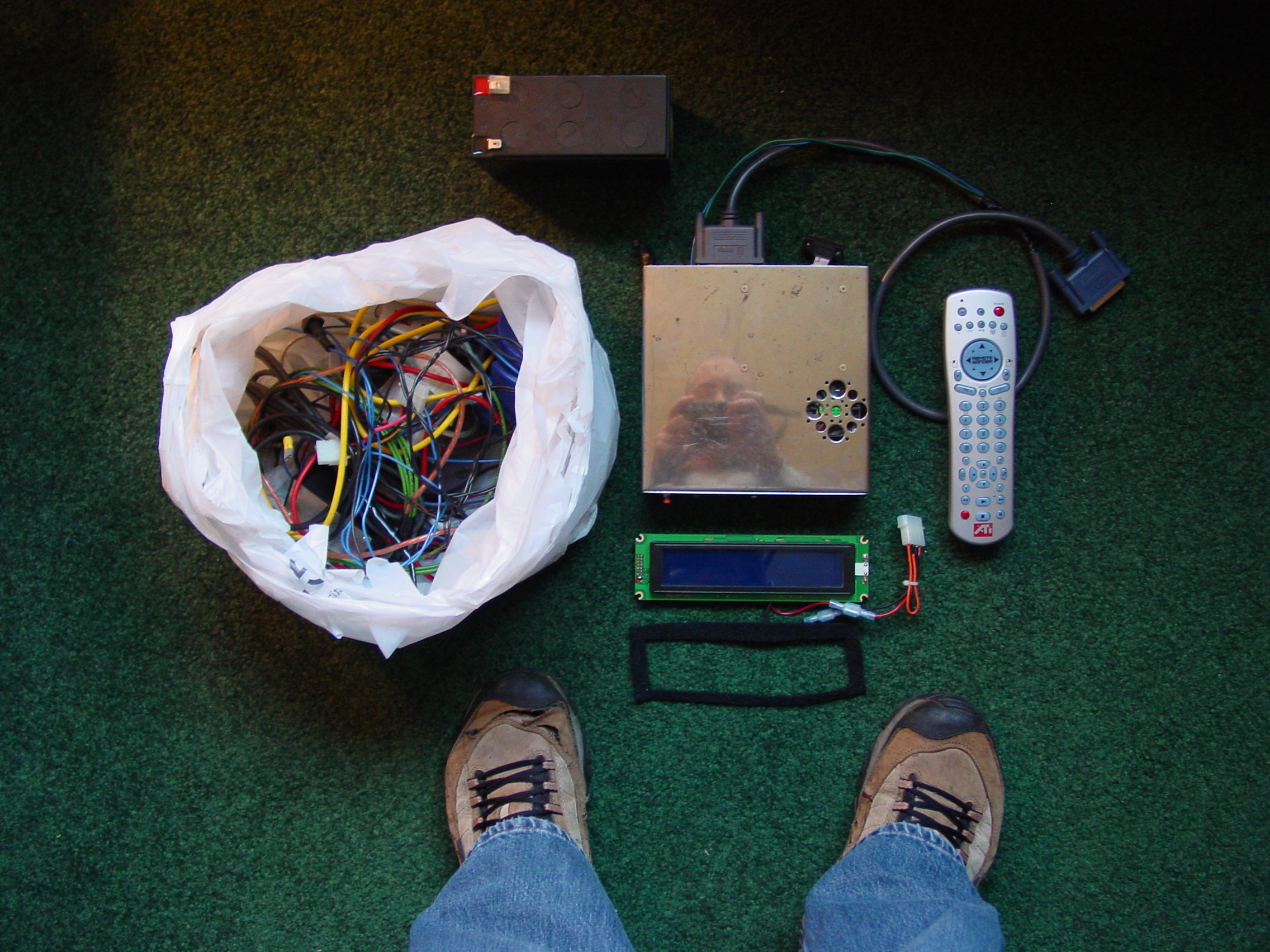
Behold, Musicbox v3.0:

More photos and details here.
The old musicbox system served me well, but since I’ve always bought 2 or 3 new albums per month, it got to be a pain having to take the system out of the car every few weeks and bring it in the house to add new music to it. And nowadays about half of my listening is podcasts, which are updated daily or weekly, which would just be totally impractical to keep updated on the old system. With the iPhone, though, it’s always automatically up to date with the latest music and shows.
From TiVo to iPhone via Awesome
When Kim bought me a TiVo a few months ago, it didn’t immediately occur to me that it was a great way to build a video archive. But a month or two later when I discovered that you can point a web browser at the TiVo and download videos from it to your computer, it started to click.
I also started to realize that there’s actually a ton of good stuff on TV, far more than I have time to watch in fact: stuff like How It’s Made, Survivorman, Planet Earth, Most Shocking, Shockwave, etc, not to mention things we’d already been into like 24, Prison Break, The Office, and Heroes.
Those last few shows need to be watched in order, and usually on or near their original airing date, but the rest can be archived and watched any old time. So for the past month or two I’ve been archiving shows; I’m up to about 250 episodes, taking up 150 gigs of space.
Back when I first got my TiVo, right away I thought about how it’d be great to be able to somehow watch its content on my iPhone. The iPhone isn’t a home theater, just like it isn’t a full PC, but the thing is that it’s always with me, so having my favorite TV shows on it would be pretty sweet. Still, it wasn’t until a couple of weeks ago that I started to really think about this, and I discovered that it’s possible and not even that hard. So I’ve written up a little guide on putting TiVo shows onto your iPod or iPhone, posted on my tech blog.
A 1-hour episode ends up using about a fifth of a gig on the iPhone. Since my 8 gig iPhone is already full, I’ve had to cut back the amount of music that’s on it a little bit to accommodate a few TV shows, and that new 16 GB iPhone is looking better and better.
I’m just continually amazed by this device; now in addition to being my phone, calendar, email & web device, music player, and podcast player, it also has my TV shows on it -- all automatically kept up to date by iTunes with minimal fuss required.
Home – Create Post – Archives – Login – CMS by Encodable