
My Solar-Powered iPhone
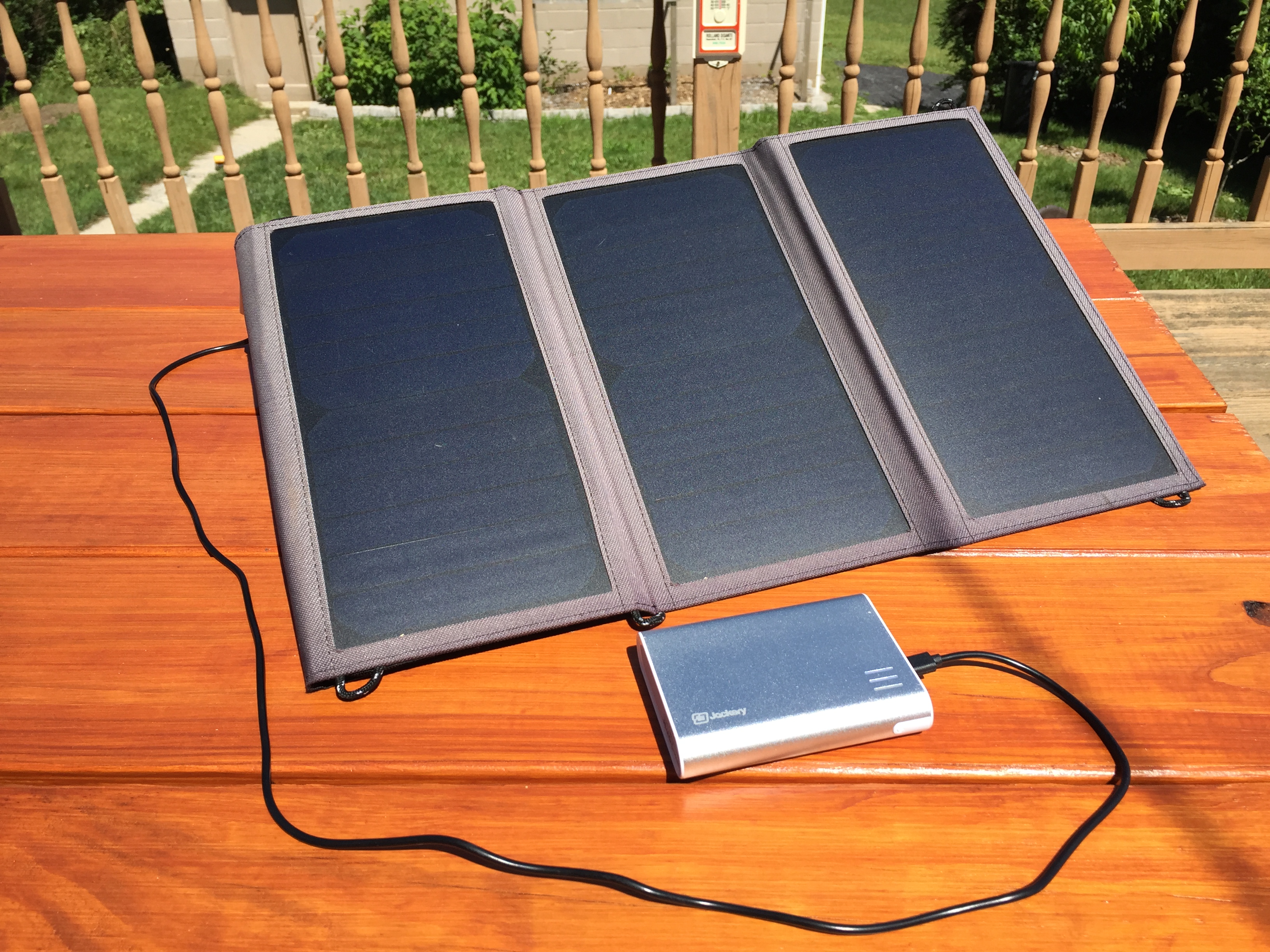 For most of this year, my iPhone has been 100% solar-powered. Same for my FitBit, my bluetooth headset, and my rechargeable batteries.
You might think this would be difficult or expensive, and 10 years ago it probably would have been. But today it’s cheap and easy.
I bought a Nekteck 20W Solar Panel for $49. This thing couldn’t be simpler. It folds pretty small for storage, or to carry in a backpack, etc. To use it, you just unfold it (it’s about one foot by two feet) and plug your USB devices into it -- it has two USB ports for charging.
The solar panel charges my iPhone 6 in about an hour on a sunny day. It also works on cloudy days, which kinda surprised me: it takes much longer, but still charges. It takes about 4-5 hours to fully charge my iPhone when it’s cloudy.
I also got a Jackery Giant battery pack for $25. This device is roughly the size of a smartphone, but 2-3x thicker. And it has USB ports to charge any USB device. It has a capacity of 12,000 mAh, compared to about 1800 mAh in the iPhone 6 itself.
The Giant lets me charge up during the day, then charge my iPhone from it overnight. And since it can charge my iPhone six or more times, it gives me some buffer for cloudy days.
Fully charging the Giant takes about 2 or 3 days, but it doesn’t need to be fully charged in order to use it.
Later, I also got this XTAR battery charger for $29, to charge my AA, AAA, and C/D batteries from the solar panel.
With this setup, I’ve been able to power all of my portable devices with 100% solar power for nearly a year now. That’s a pretty awesome feeling.
It’s nice to know that in the event of a power outage or other emergency, I have an alternative source of electricity.
And it’s also just kinda geeky-cool to be able to charge your devices without plugging them into the wall.
The $5 Tool That Will Save You Hundreds of Dollars
 You think you know about batteries, right? Actually you probably barely think about batteries at all, because they’re such a mundane item in our daily lives. What’s there to think about?
Well I recently learned something about batteries that was downright stunning. Shocking, even.
When a battery-powered device stops working, you take out the dead batteries, chuck ’em, and install fresh ones, right?
What if I told you that half of those "dead" batteries that you’ve been chucking for your whole life are not dead at all? That they are, in fact, almost brand-new and full?
It’s true. Since I bought this little $5 gadget last month, I’ve been testing the "dead" batteries that I pull out of dead toys, lights, etc. And most of the time, half of the batteries in the device are dead as a doornail, while the other half are still almost fully charged!
This seems so unbelievable. There’s no way I would believe this if I hadn’t witnessed it myself repeatedly. Well, you’ll just have to try it and see.
Comcast Tech Support
I called Comcast for some tech support, and talked to a guy whose voice sounded like your average Caucasian American, but whose speech and word-choice definitely sounded like someone whose primary language was not English.
While troubleshooting the problem, he said that it might be because of a "restriction" that was placed on my modem. I asked what that meant, and he gave some response that didn’t really make any sense to me. I must have sounded concerned about it, because he then told me not to worry, and he explained:
"Restriction" is kind of a heavy word. Maybe that’s not a good word for it. What it is is more like a kind of temporary stasis.
I almost laughed out loud. He sure busted out with a fancy phrase there for someone who sounded pretty ESL. But ESL and crazy phrases or not, he did get the job done, so good work, Comcast.
Thank you a lot!!
Hi we’ve just used your instructions to build a homemade CA-C1AX Kenwood cable and it worked like a treat. Thank you a lot for your effort and time!!!
best regards
Gerardo
The Difference Between Apple and Microsoft
On this week’s TWiT they talked briefly about the original, 5 GB, hard-drive-based iPod, and Dan Shapiro said:
I was working at Microsoft when this came out, and everybody was clustered around one of the first ones that somebody brought in. And the thing that got everybody, just, their heads spinning around, was they put a speaker in here just so that they could make it click when you turned the wheel. That was what blew everybody’s mind. And everybody around the table said, "We would never do that here."
Leo responded: "No. Because it’s bad engineering! It’s crazy! And yet, it’s great UI. It’s brilliant UI."
iPhone Annoyances, and Why I Plan to Buy an iPhone 4 Anyway
On June 7th, Steve Jobs introduced iPhone 4, the 4th hardware generation of the iPhone. It’s slightly less wide and 24% thinner than the previous version, but at the same time has better battery life and a faster processor. Its new "Retina Display" has 4x the resolution of the old hardware (960x640, up from 480x320), giving it a pixel density of 326 ppi, which is as good as or better than a lot of printed-paper text. It’s got a much-improved camera that shoots 5 megapixel photos (up from 2), has a built-in flash, and also records 720p HD video -- with a new in-phone version of iMovie for editing and publishing videos without needing a PC. There’s also now a front-facing camera to allow for video calls, although initially this will be limited to wifi; it won’t work over the cell phone network.
One of my favorite things about iPhone 4 is the physical design: I liked the original and the 3G, but this one is definitely nicer. The front and back are flat, with the corners only being rounded in 2D along the sides, as opposed to the old design where each corner was semi-spherical with its rounding including part of the back as well. And the back is now made of aluminosilicate glass, rather than metal or plastic as before; Apple says it’s the type of glass used in the windshields of helicopters and high-speed trains. Between the front and back glass panels is the thin stainless steel frame, the sides of which are part of a new antenna system that should improve signal quality, although the infamously bad AT&T cell service that some iPhone users complain about (mainly in NYC and SF) has never been a problem for me anyway.
The iPhone is Not Perfect
Lately I’ve been frustrated by my iPhone. And by lately, I mean for the past year or so. My original iPhone was great, and my iPhone 3G was great until I installed the version 3 software update on it, in 2009. Apple released the iOS3 software at the same time as the iPhone 3GS hardware, which was mostly just a "speed bump" upgrade from the 3G. I didn’t get a 3GS, for a few reasons: I would have had to pay the expensive, non-subsidized price of $499 or $599 instead of $199 or $299; it wasn’t a huge upgrade anyway, being physically identical and hardware-wise very similar to my 3G; and I really wanted a 64GB version, but the 3GS still only went up to 32GB of storage.
But when I installed iOS3 on my 3G, it got sluggish. Not terribly so, and not all the time, but enough that it started to really bother me. The iPod, iTunes, and Safari apps crash frequently -- usually several times per day. When this happens I just re-launch the app and then it works fine, but it’s really irritating nonetheless. And there’s usually no loss of data, but sometimes -- once or twice a week -- this causes the phone’s iTunes library to revert to an older state, forgetting the listened/watched status of my last few podcasts, and losing my place within the one I’m currently listening to. That’s super frustrating. Worst of all, once every couple months, a crash results in the iTunes library becoming totally corrupt, to the point that the iPod app says "No music found", even though I’ve got over 10 gigs of music on it, and syncing with my Mac fixes the problem quickly (without transferring any music; it just rebuilds the library).
The iPhone really should have a built-in "rebuild iTunes library" feature, because having this kind of corruption occur when you’re away from your Mac -- out of town, or across the country on vacation, etc -- makes me want to kill someone. And by someone I mean Apple. And not only for that reason; there’s also the fact that iTunes is a piece of absolute garbage, screwing up all my podcasts on every single sync: changing podcasts I’ve watched back to unwatched & vice-versa, and losing my place within podcasts. Because of this, I dread syncing, and only do it once a month or so.
The podcast section of the iPod app is extremely jerky when scrolling, despite the fact that there’s only 14 items in the list, whereas my album list with over 150 items scrolls smoothly. This combined with the shoddy podcast syncing, and the status/position memory bugs, lead me to believe that no one at Apple has ever watched or listened to a podcast.
I believe that the ol’ iPhone 3G is simply not powerful enough (in CPU and RAM) to run iOS3 well, and Apple should not have offered iOS3 for 3G users. That would have pissed off a lot of people, but I’d rather have a stable phone with fewer features than a more full-featured phone that crashes all the time.
All of that to say this: much of my frustration with my iPhone is due to my 3G becoming relatively less powerful as the iOS software has grown, so these frustrations don’t give me pause when I consider upgrading to iPhone 4. Its much more capable hardware will resolve most of these issues.
Smaller iPhone Gripes
There are other things that bug me about the iPhone that are more minor, though some are still quite aggravating. There’s no scale bar in the maps app. It’s been that way since day one and it defies all logic. PUT A FRIGGIN’ SCALE BAR ON THE MAPS APP ALREADY, Apple. It’s hard to believe I’m the only iPhone user who wants to know about distances while using a map.
There’s no in-page search in Safari. You can’t view the source-code of webpages nor emails. You can’t set per-email alerts, nor even per-email-account alerts; you can only enable an option to "alert me for every single email that arrives", which is entirely useless.
The iPod app’s playlist support is idiotic. When viewing my "2010" playlist for example, which contains all my albums from 2010, it’s impossible to choose an album and play it. The only option is to play every single song from every album in the playlist.
Some of these issues are geeky or esoteric, but others are just obvious and their absence ridiculous. I know that Apple doesn’t want to implement half-baked solutions, which is ostensibly the reason it took so long for them to add copy & paste -- which they did totally nail -- but at the same time, they are quite clearly allowing the perfect to be the enemy of the good in many cases.
Crap That Apple Would Never Let a Third-Party App Get Away With
In the iPod app, at the bottom of each podcast’s episode list, there’s a "Get More Episodes..." item that you can tap. But instead of simply loading more episodes right there in the same view, like the Mail app does for getting more messages from the server, the iPod app launches the iTunes app for this. That’s stupid and annoying, especially on a resource-constrained 3G that’s prone to crashes.
But what’s inexcusable is what you see when you arrive in the iTunes app:
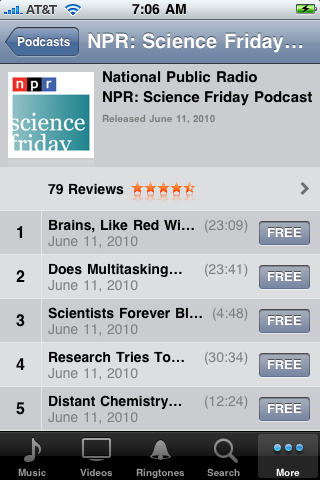
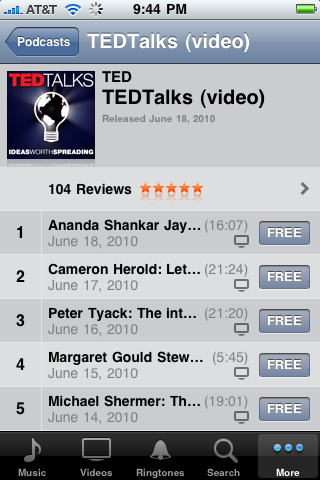
Those listings are worthless. You have no idea what any of those episodes are about, and no way to figure it out either. The listings within the iPod app, for the episodes you’ve already got, are just the same: it’s impossible to know what the topics are because of a) how stupidly short the names/titles are truncated, and b) the fact that nowhere on the device are the full names/titles displayed, not even while you’re playing them.
This kind of inattention to detail is uncharacteristically careless for Apple, and it’s the kind of thing that Gruber and all the rest would rightly criticize a third-party app for. But I haven’t heard a peep about this issue regarding Apple’s own built-in apps.
So Dump the Stupid iPhone Already
With all these iPhone issues, why don’t I switch to a different smartphone? Because the iPhone is an amazingly beautiful, useful, and fun device. It’s not perfect, but nothing is. And at this point I don’t consider any of the iPhone’s competitors to be quite as good as it is.
With the introduction of the Droid Incredible and the HTC EVO, the iPhone does finally have some reasonable competition. I’ve been using Linux on my desktop for 10 years and I love the idea of having it on my phone. I especially love the idea of ditching iTunes because, as mentioned, it is an abomination.
But I’ve been listening carefully to people who’ve been using these phones, and it’s clear that Android in general and these phones in particular are just not there yet, especially when compared to the iPhone. From poor battery life, to not-quite-accurate touch-screen response, to displays that you can’t see outdoors and whose colors aren’t quite correct, to widespread lack of polish and integration in the software stack, Android and the current crop of Android phones are at a level of (poor) usability that I’m not willing to put up with. But with a new flagship Android device coming out every couple months, I wouldn’t be surprised if a next-gen Android smartphone, a year or two from now, becomes my next phone.
In the meantime I’m psyched about iPhone 4, and I’ll continue to be a happy iPhone user, despite its imperfections.
How to Watch Internet Video On Your TV (YouTube, Netflix, etc)
I’ve been hearing more and more good things about the Roku box lately. This is an inexpensive little device - between $79 and $129 - that connects to your TV and lets you watch tons of online video from places like Netflix and Amazon Video On Demand. It also supports "channels" that allow people to add support for additional sources, including YouTube, and can display photos from Facebook and Flickr. It even supports lots of smaller indie-type stuff like the TWiT.tv podcasts, and can play your custom Pandora music stations too.
There’s a similar box from Western Digital called the WD TV Live Plus that appears to include many if not all of the same features, plus better handling of your own photos and movies via USB sticks/drives. It’s a little more pricey at $149. But the Roku seems to be quite a well-loved product, whereas I haven’t heard much about this WD device yet.
Much of the online content that you can access through these kinds of devices is free, but that generally does not include feature films and popular TV shows. For that you’d use Amazon’s VOD, which has movie rentals for a couple bucks each; or Netflix, which has a ~17,000-title library of instant-streaming movies and TV shows with unlimited access for as little as $8.99 per month. Of course Netflix is also an amazing DVD-rental-by-mail service, and the $8.99 subscription is actually their entry-level one DVD at a time package; all their packages include the instant-streaming for no extra charge.
The ultimate solution for TV, though, is TiVo. A TiVo costs $299 and is worth every penny. I don’t know how I watched TV before TiVo... actually I do know: I just didn’t bother. The TiVo’s interface for selecting shows to watch/record is by far the best I’ve ever used: there’s no messing with channels or dates or times, you just tell it the name of the show. And its fast-forward (and rewind) implementation is perfect, to the point that trying to use any other devices’s FF/RW (I’m looking at you Boxee, Front Row, etc) is just aggravating. More to the point for this article: through TiVo you can access Netflix, Amazon VOD, and lots of video podcasts like TWiT as well. I’m not sure about Facebook and Flickr, but I have a Mac mini connected to the TV for various other geeky reasons, so I just use that for anything requiring a browser.
There’s also Apple TV and Google TV, but the former has been kind of a dud, is more expensive ($229) and supports neither Netflix nor Amazon VOD (though you can buy/rent content on it via the iTunes Store); the latter isn’t yet available, and seems like it might be a built-into-the-TV feature rather than a separate box you can add to an existing TV. So for the time being, for non-geeky types who don’t want to spend a lot of money, the Roku box looks like a pretty nice solution.
Our Shadow Dragon
I never thought that I would one day drive a Kia, much less that I would want to drive one. But a few months ago in a Best Buy parking lot, I saw a sweet-looking car that I didn’t recognize at all. It was a Kia Soul, and I was intrigued.

With a little searching, I found mostly favorable reviews, which made me feel less bad about liking a Kia. And the story of the Soul’s design was certainly interesting.
We’ve wanted to get a second car for quite a while, and had hoped to get another Volkswagen, probably a Golf or a Jetta. But they start at $18,000 whereas the Soul starts at $13,000. I didn’t really like that base-model Soul, but the next one up was nice at around $15,000; and for the price of the base Golf/Jetta we could get a loaded Soul.
But there was still the whole "but it’s a Kia" thing in the back of my mind. One way to settle that issue: take a test drive and see just how sub-par it is, so that we could take it off the table as an option. So that’s what we did yesterday. The only problem was, we loved it.
It turned out that they only had a couple in stock, and even at other dealers in the northeast region, no one had a Soul that matched what we wanted: the "plus" model, with a manual transmission, with the heated seats option, and the upgraded stereo system, in Titanium gray. To get one shipped in from wherever it could be found would cost nearly a thousand dollars extra.
Of the two they had in stock, one was colored "Alien", which is a light green color that’s kind of cool, but seems like over time it’d become increasingly less cool, and then annoying, probably followed by hideous. The other was the one we test-drove, but it was a little more fancy than we were planning to get: it was the Shadow Dragon Special Edition and on top of that it had a moonroof.
So this particular Soul was a little more expensive -- in fact it was just about the cost of that base model Golf/Jetta -- but it was loaded with features that would cost about $3,000 extra on the VW; and, the heated seats and upgraded stereo weren’t even available on the VW. So even though we weren’t looking for the special edition in particular, it did have all the features we wanted, and we liked the black color scheme a lot.
My last remaining reservation was just the fact that, to me, Kia had always been synonymous with cheap. And I love my Golf; surely even if the Soul isn’t necessarily cheap, it’s nowhere near as solid as a Volkswagen, right? But then there’s the warranty: it’s 5 years / 60,000 miles basic and 10 years / 100,000 miles powertrain, compared to 3/36 and 5/60 on the VW. This was a huge selling point for us, because they couldn’t afford to offer that kind of warranty if the car wasn’t relatively solid.
Kim wasn’t crazy about the Soul’s appearance at first, but it grew on her by the time we took the test drive, which is good since she’s the one who’ll be driving it most of the time. I liked it from the jump, which is a little surprising since I really dislike other semi-similar cars like the Nissan Cube and the Scion xB (though the Honda Element isn’t bad). Our particular Soul, our Shadow Dragon, with its black-on-black color scheme and black & chrome wheels, looks to me kind of like a militarized version of a Golf. That, I like.

Comcast: We're Not Happy Until You're Not Happy
Comcast’s TV and internet service is pretty good. I mean it hardly ever goes down, and it’s pretty fast. It’s such a stark contrast with their customer service.
Yesterday I called Comcast to ask them to come out and replace my old modem with a DOCSIS 3 modem. Their website explicitly states that there is no cost for this upgrade (other than the modem rental fee I’m already paying every month). But the woman on the phone insisted that I’d need to upgrade my service to a more expensive package to get the new modem.
So I hung up and called back. It’s impossible to talk to the same person twice at a giant monopoly like Comcast, so I knew I’d get a different person, and I assumed the next person would be a little less dense. It turned out that he was indeed a little less dense. He immediately said yeah, no problem, there’s no cost and we’ll send someone out tomorrow, how’s 7-9 AM? I said that was fine.
So today, 9 AM comes and goes with no sign of Comcast. I call them at 9:15. They tell me my appointment is for 11 AM to 1 PM. I tell them that’s wrong, but it’s no use. We reschedule it for later in the week.
A few hours later, around 1:15 PM, I get a call from a Comcast technician. He’s just calling to confirm our appointment and he’s about 5 minutes away.
So, to recap: the first person attempted to extort higher payments out of me based on a lie about DOCSIS 3 modems. The second person told me my appointment was at one time, but scheduled it for a different time. And the third person rescheduled my appointment (or so she said) but didn’t bother telling the technician in the field about it.
You’d think that in this kind of bad economy, companies could afford to fire people who are incompetent, and replace them with intelligent people, from the vast pool of unemployed workers. But apparently not.
The iPad Available Tomorrow
Well, maybe "available" isn’t exactly the right word, since they’ve already sold a crapload of them via pre-order, so many in fact that they may have already burned through their first manufacturing run; they’re currently on a 10-day back order in the online Apple store. Still, the iPad does technically launch this Saturday: that’ll be the first day you can see one (and if you’re lucky, buy one) in an Apple store.
In addition to having sold millions of dollars’ worth in pre-orders, the iPad is already a huge success in another way: it’s caused many big sites to start offering standard-format video instead of Flash-only video. As I’ve been complaining here for years, Flash is complete and utter crap on Linux and Mac, running slowly, with jerky video, hogging the CPU, and causing browsers to crash. This Vimeo video for example uses 100% of the CPU and is totally jerky in Flash, but clicking the "Switch to HTML5 video" link results in smooth video and ~25% CPU usage (this is in Chrome/Ubuntu).
I’ve always considered it a feature, not a bug, that the iPhone didn’t support Flash; now with more and more sites supporting HTML5 video, that’s clearer than ever. We have Apple to thank for breaking Flash’s stranglehold of suckage on web video.
Who is the iPad for?
Since the iPad was announced a couple of months ago, many geeks have been opining that it sucks for one reason or another. Lack of Flash support was one reason, though clearly that’s mostly irrelevant now. Lack of 3rd-party multitasking is another issue, though it sounds like the iPhone OS 4.0 software update may provide that. Then there are things like lack of USB ports, no memory card slots, etc.
But those are mostly geek issues. It’s stuff that the average person doesn’t know or care about. And clearly, as with the iPhone, Apple’s target market here is not geeks, it’s the average person. Geeks want perfection; the average person just wants something useful that works well.
The iPad makes sense if you think of it as an appliance rather than a computer. Computers are complicated, with all the messy business of software, configuration, wires, peripherals; the iPad has none of that. It has "apps" instead of software; very little configuration; wireless instead of wired connectivity; and no peripherals for most uses. And perhaps most importantly, it doesn’t have these alien interfaces we call "mice" and "keyboards" -- instead it uses a much more natural touch-based interface.
To geeks and anyone under 30, mice and keyboards are hardly alien. But most people aren’t geeks, and there are huge numbers of older people for whom alien is exactly how they think of computers. My dad for example won’t touch a CD player, much less a computer. CD players and similar devices tend to have tiny screens, a bunch of tiny buttons, and horrible interfaces. And computers with their mouse/keyboard/screen interfaces and loads of messy windows are something that he simply has no interest in trying to learn. But an iPad, with its big bright screen and text, its windowless one-screen-at-a-time interface, and its natural touch-based controls?
I have no doubt that he would resist the idea at first. Maybe we’ll have to have mom get one, and leave it lying around the house for him to see. But I can’t help but think that a super-simple device allowing him to discover the internet, read books and newspapers, and -- well, that’s plenty to start with -- might be really useful for him.
Making Progress Against Cancer
The NYT has a great story in two parts (here and here) that provides a tantalizing glimpse into the future of cancer treatment. Scientists and doctors are designing drugs that target specific genes in order to directly alter cancerous cells, as opposed to more traditional approaches like chemotherapy and radiation treatment which are essentially brute-force attacks that damage the patient as much as the cancer.
Targeted therapy for cancer is not brand new, but it’s nascent compared to the more traditional therapies. It is a long and slow process to determine, develop, test, and finally administer the specific drug needed for a specific cancer. In fact it’s a process that takes years, designed for patients who often only have months to live. The NYT articles on this process are exciting but also frustrating to read; but results like this, showing dramatic tumor reduction in just 15 days, are simply amazing.
FuturePundit has more good news on the cancer front:
Death Rate Dropping From Cancer: Some reports have cited limited improvement in death rates as evidence that the "war on cancer", which was initiated in 1971, has failed. Many of these analyses fail to account for the dominant and dramatic increase in cancer death rates due to tobacco-related cancers in the latter part of the 20th century. [...] For all cancers combined, death rates (per 100,000) in men increased from 249.3 in 1970 to 279.8 in 1990, and then decreased to 221.1 in 2006, yielding a relative decline of 21% from 1990 (peak year) and a drop of 11% since 1970 (baseline year). Similarly, the death rate from all-cancers combined in women increased from 163.0 in 1970 to 175.3 in 1991, and then decreased to 153.7 in 2006, a relative decline of 12% and 6% from the 1991 (peak year) and 1970 rates, respectively.
It’s slow progress, but it’s progress.
What's a Browser?
Here is an interesting short video of a guy asking people if they know what a browser is, and whether they know the difference between a browser and a search engine. Turns out only 8% of the people knew the difference. The video includes this great quote: "Google predominates the market, obviously."
That number seems shockingly low to me, but at the same time I guess I’m not surprised. A large percentage of otherwise-intelligent people seem to mentally freeze up when the topic of computers arises. Couple that with the fact that people don’t actually need to know what these terms mean in order to use the internet, and the 8% result isn’t so surprising.
Still, I wonder why so many people have this kind of reaction to anything computer-related. I’d say there’s hardly anybody who doesn’t know the difference between, say, their cable TV provider and the various TV channels that they can watch through that provider; yet a similar kind of situation with computer issues totally baffles them. Maybe the internet is still too new for most people to understand it yet.
The video reminds me of this great article from a few weeks ago. It’s about some changes that Facebook was making to their login process, and for a while it apparently was the #1 search result on Google when you searched for "Facebook login". If you scroll down to the comments on the article, you’ll see that there are thousands of them, mostly like these ones:
Quoting confused people:
#5. The new facebook sucks> NOW LET ME IN.
#19. This is such a mess I can’t do a thing on my facebook .The changes you have made are ridiculous,I can’t even login!!!!!I am very upset!!!
#28. OK can I long in now
#31. I am not happy!!!,I was starting to feel comfortable with it now I am all confuse How do I sign in?
#43. Nothing like being taken hostage on our own computer :-(
#47. Why wont you let me sign in?
Apparently a huge number of people get to Facebook -- and presumably all the sites that they visit -- not by typing "facebook.com" into their browser’s address bar, but rather by going to Google and typing "facebook" into it, then clicking on the first search result.
It’d be easy to chalk this up to those people simply being clueless, but I think it also shows that, to whatever extent we IT people have tried to make our products and services user-friendly, there’s still a fundamental disconnect for a large percentage of the population which may indicate that on some level we’ve failed. And ironically this works to Facebook’s advantage, because to many people Facebook is the internet, just as AOL was the internet for many people a decade ago.
Nice website Anthony
I haven’t been to your web site in a while and I thought I would show a friend. We both enjoyed your commentary on life and politics.
This morning I volunteered at SCALE 8x helping with A/V support. It was at the Westin LAX hotel. What a blast! Representation was good (redhat, xen, google, hp, yahoo, kde). I am definitely going to volunteer next year!
I saw a training session for health care provider management software that I have never heard about called ClearHealth
P.S. Be sure to let me know if you are ever coming to OC and I can finally meet you!
The iPad
On Wednesday Apple announced the iPad, and it looks really nice. Their tagline says it’s a "magical and revolutionary" device, which to me seems like a stretch even for Apple -- but everyone at the press event who actually got to hold one and use it has said that you won’t really get it until you hold it. It’s apparently crazy fast which would certainly contribute to the wow factor.
The iPad would make a killer device for anyone who spends a lot of time flying, or on a subway. It’ll be great for reading websites, magazines, newspapers, and ebooks. And it’s perfect for medical professionals, insurance agents, real estate appraisers, etc -- assuming that whatever software those people are already using on laptops and desktops gets ported to the iPad.
One of the most compelling features of the iPad is its price: considering that many people were expecting it to cost near $1000, its $499 price is pretty amazing. And just looking at the thing, how beautiful it is, and everything it does, it’s hard to imagine they’re making much profit on the $499 model. Of course you can spend more to get models with more storage space and/or with 3G connectivity as opposed to just wifi.
The iPhone for me has certainly been magical and revolutionary; it’s hard to imagine living without one now. It’s with me 24/7 and I use it dozens of times per day for email, web browsing, and listening to and watching podcasts -- no to mention checking the weather, making phone calls, playing music, and lots of other things. So as cool as the iPad is, I just don’t see it having anywhere near the same level of impact on my life that the iPhone has had.
My biggest reservation though can be stated in one cursed word: iTunes. I hate iTunes with a burning hatred, and I’m not sure I want to accept into my life another device that forces me to use iTunes. As it is, I can barely stand to deal with it on the ~2 times per month that I sync my iPhone with it. And unfortunately, with Apple, it’s iTunes or the highway. It’s honestly hard for me to understand how a company capable of making such beautiful and amazing devices is also capable of creating and maintaining such a disaster of a product as iTunes is.
Anyway if you want to see the iPad before it goes on sale in about 60 days, you can check out the video -- but only if you’re on a system where iTunes is supported. Apple is not interested in selling stuff to Linux users.
UPDATE: by scraping the web page’s source code and then dissecting the fake movie stubs in the URLs, I was able to find these direct links to the videos, which should play fine on all systems including Linux: small, medium, large. But given that the actual URLs/filenames are datestamped to today, who knows how long the links will continue to work.
Computer Desktops
Extremely good insight from John Siracusa (via Gruber) about why people tend to save files and folders on the desktops of their computers:
Quoting John Siracusa:
The reason is simple: the desktop is the one "place" on the computer that every user knows how to get to. People don’t even think of it as existing in the file hierarchy (though, of course, it does); to them it’s a location in the physical sense, and items placed within it behave almost as if they were real objects. A file can be "lost" in the file hierarchy -- irretrievably, as far as novice users are concerned -- but finding something on the desktop will never be any worse than rummaging through the messiest real-life junk drawer. And that bargain, that task of keeping things neat by placing, removing, and arranging, is something that people are comfortable with, and that their innate human abilities are tailored for.
Virtually every computer that I’ve seen or worked on over the past decade-plus, other than my own, has had files strewn about its desktop. This always drives me crazy. But looking at it from a non-geek perspective as John explains, it makes perfect sense: virtually every non-geek I know also has at least some level of difficulty with the whole concept of files and folders in a filesystem -- but the desktop is a separate, simple place unencumbered by that confusion.
Google Chrome OS
I love this screen from the What is Google Chrome OS video:
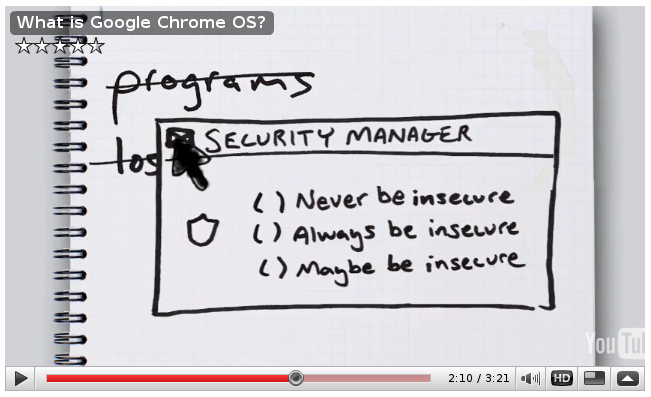
The whole video is interesting and worth watching, too.
Carbonite Automatic Online Backup
Speaking of good ideas for Windows users: if you use Windows (or Mac in this case), and you have important files on your system, you should probably use Carbonite. It’s an online backup service with unlimited storage for $5 per month.
I haven’t personally used it, because unfortunately there’s no Linux version. If there were a Linux version, I wouldn’t think twice about it. But I feel good about recommending it because I trust Leo’s judgment on these kinds of issues, and I know he uses it.
Of course you should be doing backups to an external hard drive already. But that won’t protect you in the case of a fire that destroys the backup drive too, or a thief who takes all your computer gear. That’s why offsite/online backup is so important.
There’s also the fact that backups are only good if you actually keep them up to date, and hardly anybody does. Carbonite solves that problem by running in the background all the time, keeping your online backup in sync with the files on your computer. So you don’t have to worry about doing backups; they happen automatically, continually.
As an added bonus, you can also log into the Carbonite website from anywhere and access your files.
To me, all of that for $5 per month is a no-brainer, especially in light of the old adage that there are two kinds of computer users: those who have lost data, and those who will lose data.
Speed++
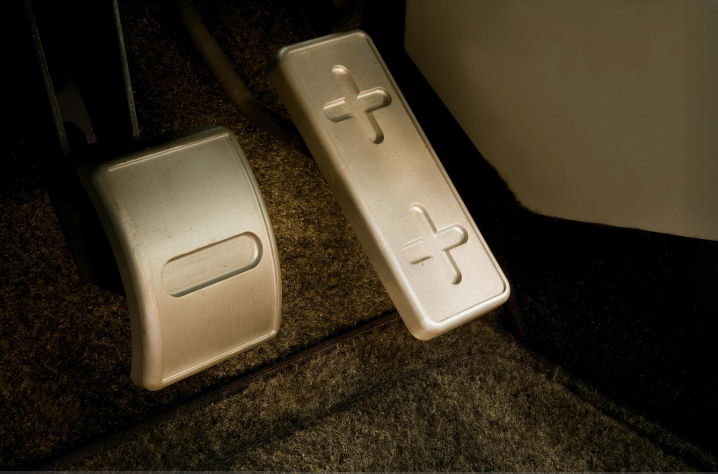
Autoblog Green has some nice new photos of the Aptera 2e. I love the geeky brake & gas pedals:
A Space Program for the Rest of Us
Writing in The New Atlantis, Rand Simberg presents an interesting and informative insider’s view of the history of our space program. He takes a critical but rational view of the space program and presents some reasonable solutions to some of the bigger problems.
Quoting Rand Simberg:
[With a] space-refueling infrastructure, propellant would be cheaper, flight hardware wouldn’t have to be as heavy, and alternative launch vehicles would flourish. Every year that we starve the kind of research and technology that would make this possible and instead spend our money on mega-launchers like the Ares V is another year that we delay developing a truly sustainable space transportation infrastructure--and becoming a truly spacefaring people. [...]
The Bush administration might have done well to establish an Office of Space Development (with "exploration" being merely a means to an end) that could draw on other federal resources--not just NASA, but the Departments of Defense and Energy--as well as the private sector.
Of course, an independent space development organization with such power would be politically unfeasible. But that is part of the problem: our sclerotic space agency is subject to forces of legacy politics; it protects existing bureaucratic structures and emphasizes jobs over achievement; and it perversely rewards failure with more funds and punishes success with budget cuts.
He makes a persuasive case for the need to reform the space program.
Two Years Ago Today, This Was Still My Phone
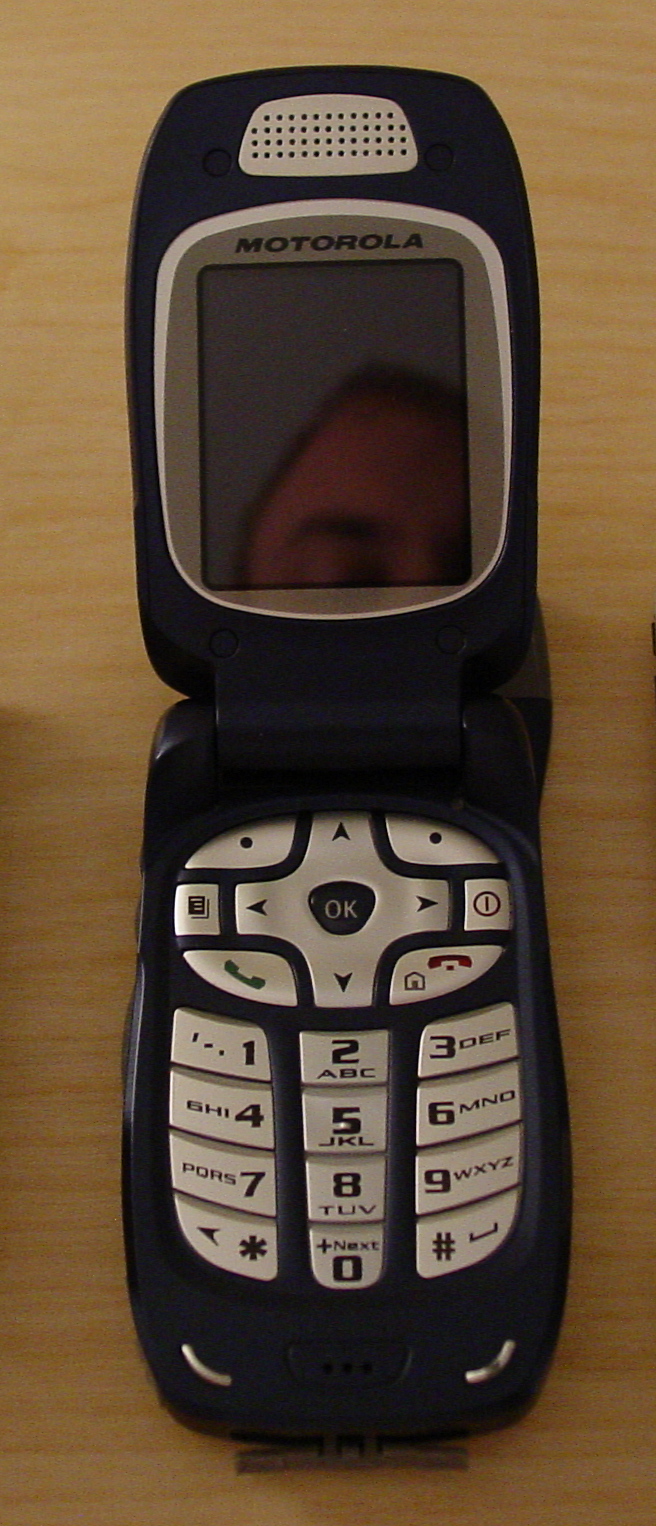
For a decade I suffered this piece of junk -- or a different but essentially identical one.
(Hat tip; Flickr pool; my comparison album)
Baghdad Bob, Now Serving Iran?
Quoting Iran’s Foreign Ministry spokesman:
"This is the CNN’s schedule. They officially trained the people to come and hack Iran’s government Web sites. This is the English text, I can give it to you. This is a cyber war. This, with, isn’t it a cyber war of the media with an independent government? They asked people to use the DOS system to hack our Web sites," Qashqavi said.
I hear what you’re saying, but honestly, if they’re trying to use the DOS system to hack your Web sites, you’re probably OK.
1000 FPS in Slow Motion
Sweet video here. The hangtime on that jello is amazing.
I would download the 720p or 1080p version, rather than playing it in your browser, to avoid skipping and stuff.
Meet the Command Line
If you’re a Mac or Linux user, and you want to learn about the command line that powers much of your system; or if you’re stuck with Windows but you secretly wish you were a Mac or Linux user who wanted to learn more about the command line; then PeepCode’s new Meet the Command Line video is for you. It looks to be extremely well done and super informative. Check out the 3-minute preview to get a feel for it.
Sweet Vacation Video
Cabel Sasser has a little review of the Canon SD960 point-and-shoot camera, but the best part is the short video he put together. It’s amazing what you can do nowadays with iMovie and a $299 camera -- not even a video camera, just a camera.
New TV: Before and After
We finally ditched our stone-age TV and got an HDTV. I thought it’d be fun to take some before and after photos.
Here’s an angle-shot from before (click for after):

Here’s a head-on shot from before (click for after):

Here’s the input/output panel from before (click for after):

Home – Create Post – Archives – Login – CMS by Encodable