
Nice website Anthony
I haven’t been to your web site in a while and I thought I would show a friend. We both enjoyed your commentary on life and politics.
This morning I volunteered at SCALE 8x helping with A/V support. It was at the Westin LAX hotel. What a blast! Representation was good (redhat, xen, google, hp, yahoo, kde). I am definitely going to volunteer next year!
I saw a training session for health care provider management software that I have never heard about called ClearHealth
P.S. Be sure to let me know if you are ever coming to OC and I can finally meet you!
More Advice for Windows Users: Stop Using Windows
Brian Krebs, writing for the Washington Post:
Quoting Avoid Windows Malware: Bank on a Live CD:
I have interviewed dozens of victim companies that lost anywhere from $10,000 to $500,000 dollars because of a single malware infection. I have heard stories worthy of a screenplay about the myriad ways cyber crooks are evading nearly every security obstacle the banks put in their way.
But regardless of the methods used by the bank or the crooks, all of the attacks shared a single, undeniable common denominator: They succeeded because the bad guys were able to plant malicious software that gave them complete control over the victim’s Windows computer. [...]
The simplest, most cost-effective answer I know of? Don’t use Microsoft Windows when accessing your bank account online.
The ideal solution is to permanently switch to a Mac (or Linux). But as Krebs suggests, booting a Linux-based Live CD is a quick & cheap solution. You just download the latest version of Ubuntu and burn it to a CD. Then reboot your PC with that CD in your CD-ROM drive, which will temporarily turn your PC into a Linux PC that is far more secure than Windows. Use that to do your banking, and when you’re done, remove the CD and reboot again to get back to Windows. The Live CD doesn’t touch your hard drive at all, so it doesn’t mess with your existing system, and any viruses or other security threats that surely are might be there on your hard drive cannot activate themselves to infect the Linux-based Live CD environment.
Meet the Command Line
If you’re a Mac or Linux user, and you want to learn about the command line that powers much of your system; or if you’re stuck with Windows but you secretly wish you were a Mac or Linux user who wanted to learn more about the command line; then PeepCode’s new Meet the Command Line video is for you. It looks to be extremely well done and super informative. Check out the 3-minute preview to get a feel for it.
Current Map of Global Daylight
The other day I noticed this cool feature in the calender/location dialog that comes up when you click the clock in the Gnome taskbar.
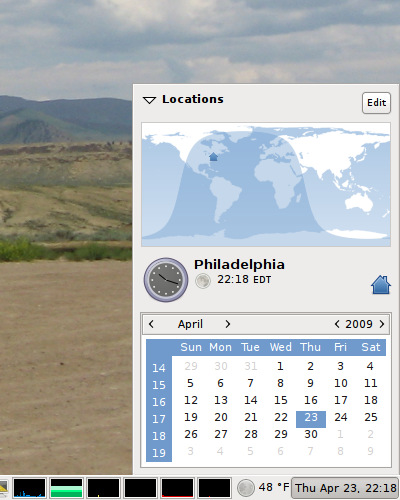
It’s neat in a geeky way, but it’s also pretty useful if you have friends/family/clients in other countries who you need to communicate with.
iTunes on Windows
Steve Jobs was interviewed last night at "D", the All Things Digital conference. Best line:
Quoting RSJ:
We’ve got cards and letters from lots of people that say that iTunes is their favorite app on Windows. It’s like giving a glass of ice water to somebody in Hell.
Since I run Linux I don’t have much use for Mac OS X nor Windows. But I used to be a Windows user, and unfortunately I still need to keep it around because of friggin’ IE, and I can say that it’s certainly the closest OS to Hell that I’ve used. I also need to keep a Mac OS X system around because of friggin’ Safari, and we’ve now watched quite a few episodes of The Office on it, and it really is quite a joy to use. iTunes really is pretty sweet, it’s awesome to be able to download a whole 350 MB TV show in 8 minutes, and the interface for the video player is totally lickable.
Update: check out the Steve Jobs and Bill Gates interview. I’m only halfway through it so far and it’s been really interesting. (Note: the video embedded in that page is just the prologue; scroll down for links to the rest of the presentation [i.e. the actual interview].)
Geek Humor
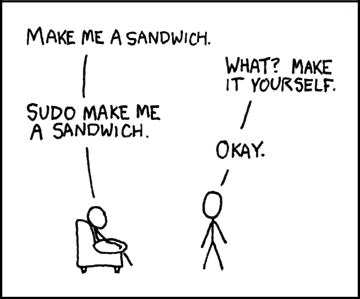
If you’re not familiar with sudo, then this probably won’t make any sense to you. That’s OK. Trust me, it’s hilarious.
(Source)
Goodbye Gentoo, Hello Ubuntu
I think I’m officially switching from Gentoo Linux to Ubuntu Linux. Despite having what can only be described as one of the dumbest names imaginable, Ubuntu (that’s oo-BOON-too) seems to have largely achieved the holy grail of Linux computing: it just works.
I downloaded its single-CD installation file, booted a system with it, and within an hour had a completely up-to-date Linux desktop. Checking the "sync with time servers" box on the Date/Time dialog actually works, with no need to manually install/configure any NTP nonsense. It comes with Firefox, Gaim, and OpenOffice right out of the box, and you can install new packages from the GUI with automatic dependency resolution. It even auto-updates just like Windows and OS X.
I’m sure I’ll be writing more about this, but for now I’m in shock and had to put something up quick. It’s just so exciting to see a Linux distro that is both simple to install and simple to maintain.
Unix hacker stuff
Here’s a one-liner to print the aspect ratios of all the JPEG images in a directory. I’ve broken it up onto multiple lines here, just for readability:
for f in *.jpg; do {
echo -n "$f "; identify $f
|grep -oE "[0-9]+x[0-9]+"
|sed ’s!\(.*\)!scale=3;\1!’
|sed ’s!x!/!’|bc;
} done
(You can also substitute [[:digit:]] for [0-9].)
What it does:
• the identify command (from the ImageMagick package) prints info about the JPEG, including its dimensions as XxY, which we grep out.
• we use sed to prepend "scale=3;" so that bc prints 3 decimal places.
• sed again to change XxY to X/Y.
• pass "scale=3; X/Y" to bc, the command-line calculator, to perform the division.
Requires just ImageMagick, sed, and of course bash, all of which are present on most modern Unixes and Linuxes.
Choose your CFLAGS Wisely
Kim’s laptop died the other day. The hard disk and all its data were fine though, and since the system runs Linux, the obvious solution is to just put the disk into another computer.
The laptop was a Pentium III, and the "new" (old) computer into which the disk is going is a Pentium II. This would be no problem, except that in the system’s /etc/make.conf file (this is Gentoo) I was using CFLAGS="-march=pentium3".
In the new system, the disk booted fine and everything, services started, I could log in, networking worked, etc. But X wouldn’t run; it died with a "signal 4" error -- illegal instruction/operation. Same for GCC. I realized that the software was trying to use PIII tricks that the PII didn’t have.
If only I had chosen my CFLAGS more carefully:
These -m options are defined for the i386 and x86-64 family of computers:
-mcpu=cpu-typeTune to cpu-type everything applicable about the generated code, except for the ABI and the set of available instructions. The choices for cpu-type are i386, i486, i586, i686, pentium, pentium-mmx, pentiumpro, pentium2, pentium3, pentium4, k6, k6-2, k6-3, athlon, athlon-tbird, athlon-4, athlon-xp and athlon-mp.
While picking a specific cpu-type will schedule things appropriately for that particular chip, the compiler will not generate any code that does not run on the i386 without the -march=cpu-type option being used. i586 is equivalent to pentium and i686 is equivalent to pentiumpro. k6 and athlon are the AMD chips as opposed to the Intel ones.
-march=cpu-typeGenerate instructions for the machine type cpu-type. The choices for cpu-type are the same as for -mcpu. Moreover, specifying -march=cpu-type implies -mcpu=cpu-type.
So -march gives you the heaviest optimization and thus the best performance, but at the cost of portability. Programs compiled with -march=pentium3 that take advantage of the PIII’s advanced features won’t run on the PII. But -mcpu on the other hand will "tune" the compilation to the target CPU, while still maintaining full i386 compatibility. I could take this PIII-optimized operating system and drop it into a PII box and it would run without me needing to recompile anything.
Looks like this ol’ 333 MHz Pentium II will be spending the next few days building a lot of software...
WiFi
A few weeks ago I switched our Linux systems to wireless network cards. Since wifi on Linux is still a big pain to get working, I wrote up a couple of start-to-finish HOWTOs in the hopes that others might find them useful.
Wireless success: Netgear WG311, madwifi, wpa_supplicant Wireless USB success: Netgear WG111, ndiswrapper, WPA
If you’ve got a wireless network card but aren’t having the best reception, make sure to give the WiFi Spray a try.
On an unrelated note, in case you weren’t sure that Steve Ballmer was completely insane, here’s more proof.
The End Is Near
Signs of the apocalypse:
Pope dies.
German Pope elected.
Apple moves to Intel.
Microsoft moves to PowerPC.
Debian stable released.
Apple releases multi-button mouse.
(From a couple of Slashdot & ARS posts.)
Felicitations
I just got an email from someone named Phil in France, who found my Linux notes helpful and offered me "felicitations." That’s fun :)
Speaking of Reasons to Hate Windows...
The thing that most frustrates me about Windows is its lack of command-line remote administration. You can hack it in via OpenSSH for Windows but it’s far from perfect -- you can’t use any interactive commands because of problems with STDIN/STDOUT mapping, which cuts out a pretty large swath of the programs you’d like to run. And it lacks tab-completion as well as command history; pressing the Up key actually makes the cursor move up on the screen.
Even if it worked perfectly, Microsoft makes some things impossible via command line. For example, I recently discovered that you can use Scheduled Tasks (in the Control Panel) to run a program at boot without having it attached to a window. That’s awesome for background programs that you’d like to keep running all the time but that you don’t really want cluttering up your taskbar because they take no user input (like Eponym). But there’s no equivalent command-line way to access the Scheduled Tasks functionality. There’s "at" but it can’t schedule an event at boot nor multiple times per day. There’s "schtasks" which actually IS equivalent to Scheduled Tasks in the Control Panel, but it’s not included in XP Home.
The unxutils package improves the situation drastically, giving you lots of the most handy Unix tools like grep and wget. And of course you can use VNC to do remote administration via the full Windows GUI. But that’s inconvenient because most internet links are slow, and because you often can’t or don’t want to take over a system that someone else might be using just to do a task that should only require the command-line anyway.
I say that MS should take after Apple: admit that the only thing going for their OS is its nice looks and ease-of-GUI-use, and then get to work building that on top of a REAL OS with nice internals (i.e. Linux or BSD).
And also, Superunknown is still a really good album.
Home – Create Post – Archives – Login – CMS by Encodable